OpenBroadcaster is a full-featured radio automation and broadcasting application designed for internet broadcasters, podcasters, DJs, and live streamers of all sizes. Built with modern technology, it provides professional-grade tools to manage music libraries, schedule playlists, stream live audio, and engage your audience — all from one intuitive interface.
🎧 What Is OpenBroadcaster?
OpenBroadcaster is an advanced internet radio automation system that empowers you to run a full broadcast station from your desktop. Whether you’re launching a community radio project, powering a podcast network, or automating live streams, OpenBroadcaster gives you all the tools you need — plus flexibility and extensibility thanks to its open-source nature.
🔥 Key Features
📚 Music Library & Media Management
-
Import entire folders or individual tracks (MP3, WAV, FLAC, AAC, OGG, WMA).
-
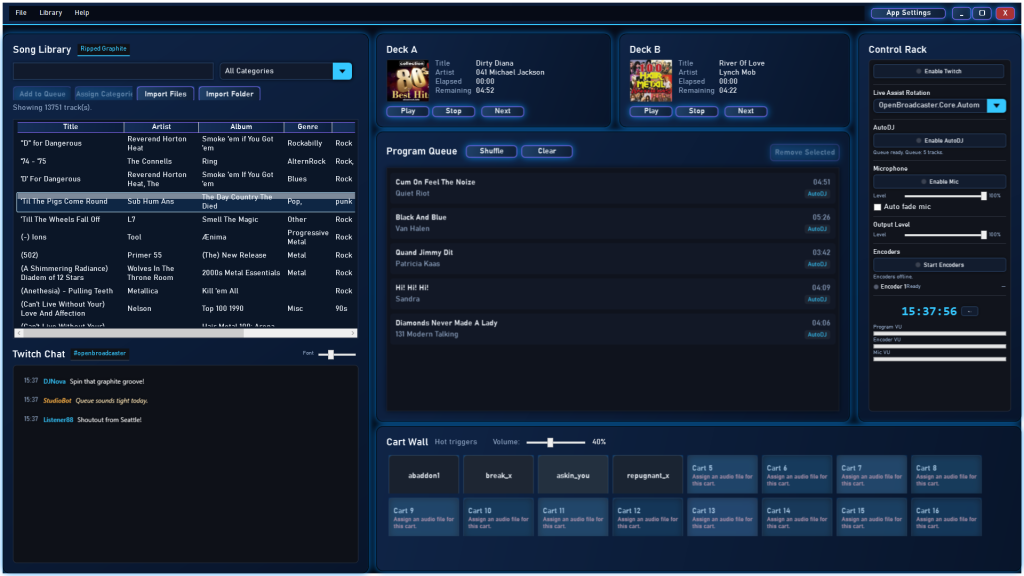
Automatic metadata extraction (artist, title, album, genre, duration).
-
Advanced category system for organizing your tracks.
-
Fast search and filters to find what you need instantly.
🎛️ Dual-Deck Playback & Live Control
-
Professional dual decks (Deck A & Deck B) for seamless mixing.
-
Visual elapsed/remaining time and playback controls.
-
Manual, program, and automated play modes.
🤖 Smart Automation & Scheduler
-
AutoDJ with rules-based rotation (artist separation, minimum wait times).
-
Clockwheel scheduler for time-based programming.
-
Priority queue management from multiple sources.
📻 Multi-Encoder Streaming
-
Broadcast to multiple Shoutcast and Icecast servers simultaneously.
-
Secure SSL/TLS connections and auto-reconnect on network drop.
-
Metadata injection for “Now Playing” info on stream directories.
Screenshot Here – Streaming setup or encoder configuration UI.
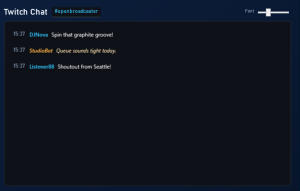
💬 Twitch Integration & Song Requests
-
Integrate with your Twitch channel chat.
-
Accept viewer song requests with a loyalty point system.
-
Cooldown control to prevent spam.
📊 OBS Overlays & Real-Time Display
-
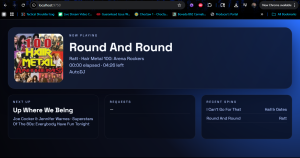
Built-in HTTP server provides real-time overlay data.
-
Ready-to-use HTML/CSS/JS templates for OBS browser sources.
-
Display now playing info, queue, artwork, and request stats.
🌐 Web & WordPress Integration
-
Built-in HTTP API returns JSON for now playing, queue, and search.
-
Official WordPress plugin for live widgets (now playing, library, requests).
-
Easy integration into your website for engaged listeners.
🛠️ Who Is OpenBroadcaster For?
✅ Community radio stations
✅ Internet radio & podcast networks
✅ DJs and live streamers
✅ Schools, campus radio, nonprofit broadcasters
✅ Anyone who wants to automate audio playback and streaming
OpenBroadcaster is ideal whether you’re just starting or running a full-time broadcast.
📦 Free Core + Premium Convenience
OpenBroadcaster’s source code is fully open-source, hosted on GitHub, and free to download. You can self-build the app or integrate it into your systems.
✨ Upgrade options (installer, WordPress plugin, support) are available if you want a polished distribution experience with easy setup and updates.
🧠 Why Choose OpenBroadcaster
-
Open-Source Freedom — Modify and extend as you need.
-
Professional Tools — From AutoDJ to Twitch integration.
-
Web-Driven Workflow — Integrate with websites and remote dashboards.
-
Community Backed — Built with broadcasters in mind.
📥 Get Started Today
👉 Download the latest source code on GitHub
👉 Explore setup guides and documentation
👉 Add overlays & widgets to your site
Make your broadcast station truly yours with OpenBroadcaster.
⚡ Quick Links
-
📖 Documentation & Guides
-
📺 Support & Tutorials